OneBlinc - Financial tools
- 4.6
- Rating
- 100.00K
- Installs
- Free
- Price

 Analysis by App-foxy
When an unexpected bill arrives before payday, the problem is often not a lack of income but a timing gap. OneBlinc is a finance app from OneBlinc built around that exact situation: it lets eligible users access wages early and send the money to a linked account. I found its central idea easy to understand, but the real value depends on using it as a short bridge rather than treating early access as extra income.
The app is free to install and aimed at Everyone, which makes the first impression approachable. It has reached over 100 thousand installs and holds a 4.6 average from around 4.8 thousand ratings, so it is not an obscure experiment. Its current version is 7.12.0, and it runs on Android 7.0 or later. Those details matter mainly because the app is designed for ordinary phone users, including people who may not want a complicated finance dashboard.
Early wage access is the feature that defines the experience
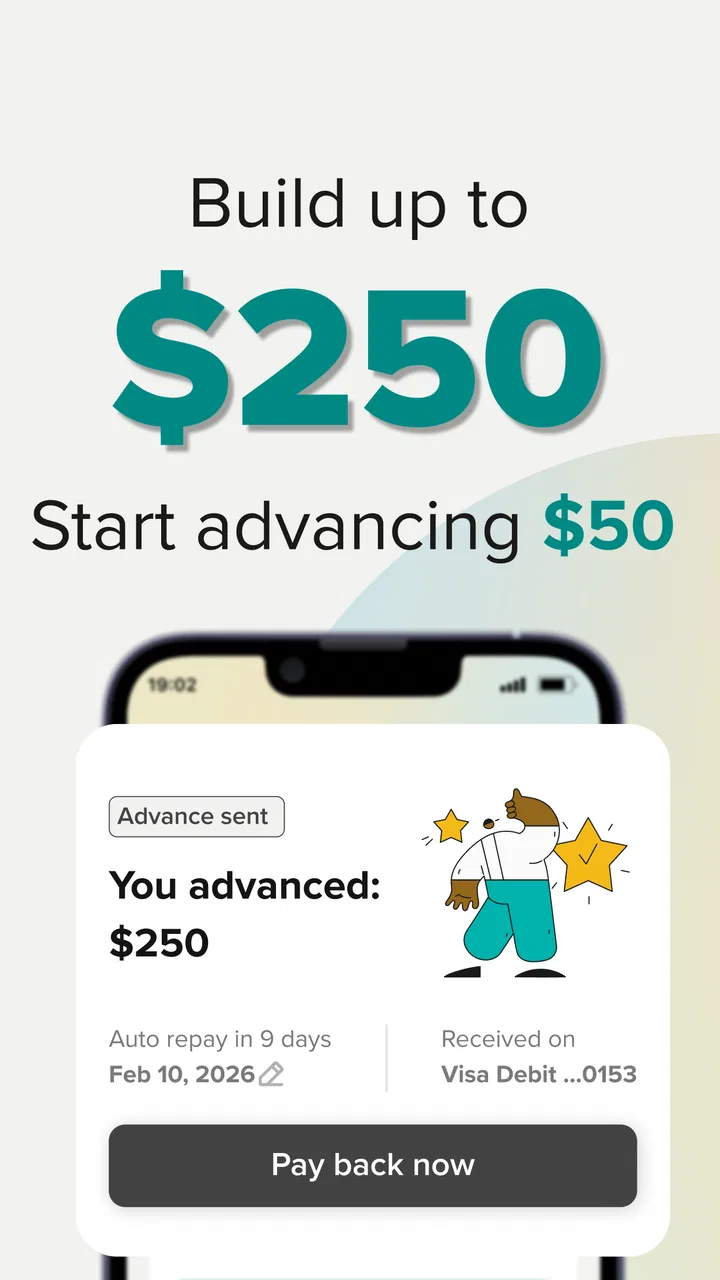
The standout capability is access to up to 250 dollars of wages before the normal payday, sent directly to a linked account. That is a much narrower promise than a general budgeting app, investment service, or traditional loan product. In my view, that focus is OneBlinc’s strongest quality: you do not open it expecting a complete financial planning system. You open it because your earned money and your immediate expense are out of sync.
You May Also Like

 Blood Strike: 2.5 Anniversary
Blood Strike’s Loadouts Turn Every Drop Into a Tactical Gamble
A close look at Blood Strike’s custom loadouts: how fast access to signature weapons reshapes its battle royale rhythm, rewards preparation, and narrows the gap between fights.

 Pandora - Music & Podcasts
Pandora’s Music Is Easy to Start, but Harder to Recover
Pandora’s strength is its low-effort path from a seed to a station. Its weak spot is how much confidence it asks you to place in connection, setup, and quiet recovery.

 8 Ball Pool
 Is Built on Rivalries, Rematches, and Routine
A close look at the rivalries, rematches, shared routines, and unanswered safety questions that turn a quick pool match into a persistent mobile community.

 Samsung Music
’s Quiet Strength Is Playing What You Already Own
Its reach comes less from spectacle than from dependable access to a personal library. That simplicity is both the app’s strongest retention engine and its ceiling.

 AccuWeather: Weather Radar
AccuWeather Review: A Quick, Clear Forecast for Everyday Decisions
For everyday plans, the best forecast is the one you can understand quickly. AccuWeather makes rain timing, radar, and local conditions easy to act on, with a few trade-offs.

 Hill Climb Racing
Why Hill Climb Racing Still Turns Crashes Into One More Run
A tiny car, a bumpy hill and one more upgrade: Hill Climb Racing keeps resurfacing because its simple chaos makes every near-miss feel personal.
More From Our News Desk



That distinction changes how I would recommend it. If your goal is to track spending, build a long-term budget, or compare savings products, a dedicated budgeting or banking app will probably be more useful. If your goal is to cover a small, time-sensitive expense with wages you are already expecting, the early-access model is much more relevant.
The useful question is not simply, “Can I get money now?” It is, “Will receiving part of my wages early solve a specific problem without creating a larger one later?” I think that is the right mental test for this app. It can reduce pressure during a short cash-flow gap, but it does not increase the amount you earn during the pay period.
What the linked account changes
Sending the money to a linked account makes the feature more practical than a balance that can only be spent inside the app. In everyday use, the account is where rent, groceries, transport, and household bills are normally paid. Direct access means the money can fit into the same routine as the rest of your finances instead of forcing you to manage a separate spending destination.
That convenience also deserves caution. Linking an account is a meaningful step, not a minor setup detail. I would use an account that I check regularly and keep notifications or transaction alerts active on it. Before requesting an advance, I would also review the next expected pay cycle and the bills scheduled around it. The benefit is greatest when you know exactly what the early money is for.
OneBlinc’s store presence describes the capability in plain terms, but a short description cannot tell you whether the experience will fit your personal situation. Eligibility and the amount available can depend on information connected to your wages and account. I would therefore treat the first setup as an assessment of suitability, not as a guarantee that the maximum amount will always be available.
How I would use it in practice
I would begin by installing the free app, creating the account, and connecting the account where I want the funds delivered. I would then read each screen carefully, especially anything explaining repayment timing, access limits, or account requirements. Finance apps reward patience during setup. Tapping through quickly can leave you unsure about when the money will arrive or how the next pay cycle is affected.
Once access is available, I would request only what the immediate expense requires. If a utility bill needs 80 dollars, taking the full available amount would make little sense unless there is another definite need. This is one of the less obvious ways to use the product responsibly: the maximum is a ceiling, not a target.
After the transfer, I would record the amount in my normal budget as money already spent from the coming paycheck. That small habit prevents the common mistake of seeing the early deposit as a bonus. It also makes it easier to decide whether the app helped or merely moved the same shortage forward.
The most useful workflow is to pair the app with a simple calendar reminder. I would note the amount accessed, the expected payday, and the bill it covered. On payday, I would check whether the remaining income still covers essentials. This turns an emergency tool into a controlled short-term plan rather than an automatic reflex.
A realistic everyday example
Imagine that a phone bill is due three days before payday and an unexpected grocery expense has already used the money set aside for it. In that situation, OneBlinc may provide a practical bridge: access the amount needed, send it to the linked account, pay the bill, and wait for the normal wage cycle to restore the balance.
The important detail is that the user should already know how the next paycheck will look after the early access. If the bill was a one-off timing problem, the app may prevent a late payment or the need to ask a friend for help. If the same shortage happens every pay period, the transfer only masks a recurring budget problem. In that second case, a spending review, bill negotiation, or more predictable savings plan would be the better long-term answer.
I also see a use case for workers whose pay arrives on a fixed schedule but whose essential bills do not. A small gap between those dates can be stressful even when the monthly income is adequate. The app’s value is strongest when the user has reliable upcoming wages and a clear reason for needing a portion sooner.
Where the experience may feel limited
The focused design is useful, but it also means I would not confuse this app with a full financial control center. It is not the tool I would choose for categorizing every purchase, planning investments, comparing bank accounts, or setting detailed long-term goals. Someone looking for those functions may feel that the app is too narrow.
There is also a behavioral trade-off. Easy access can make it tempting to request money for discretionary purchases that could wait. A meal, a sale item, or entertainment may feel urgent in the moment, but bringing wages forward for those expenses can make the next payday tighter. I would reserve the feature for essentials or clearly planned needs.
The maximum access amount is another practical boundary. Up to 250 dollars can be meaningful for a small bill, groceries, or transport, but it will not solve a major rent shortfall or a large emergency repair. Trying to use a small early-wage service for a large financial crisis could leave you with both the original problem and less money in the next pay cycle.
Speed should not be assumed to mean instant availability in every circumstance. Transfers involve account connections and eligibility checks, and the useful timing depends on how those steps work for the individual user. If a payment is due within minutes, I would not wait until the last moment. I would set up the app well before an emergency and verify that the linked account is working.
Another point I would keep in mind is the total cost of using any wage-access service. The app is free to download, but “free” should not automatically be interpreted as every possible transaction being costless. Before confirming a request, I would inspect the final terms and any delivery or service choices shown in the app. That check is more important than relying on the installation price alone.
How it compares with familiar alternatives
Compared with asking a friend or family member for help, OneBlinc offers a more private and repeatable process. You do not need to explain the situation to someone you know, and the money can go to your own linked account. The trade-off is that a personal loan may be more flexible or cost-free depending on the relationship, while an app-based advance is governed by its own eligibility and repayment structure.
Compared with a credit card, early wage access is tied to expected income rather than an open revolving balance. That can be easier to understand for someone who wants to avoid carrying a growing card balance. On the other hand, a credit card may be more suitable for a larger purchase or a purchase that needs a longer repayment period, provided the user can manage the interest and payments responsibly.
Compared with overdraft protection, OneBlinc is more deliberate because you request money before the account falls short. That planning can help avoid an accidental negative balance. An overdraft facility may still be more convenient for a transaction that cannot wait, but it can also make spending feel automatic. I prefer the advance model when I know the amount and purpose in advance.
Compared with a standard personal loan, the app is better suited to a small, short-lived timing issue. A loan may provide more money and a structured repayment schedule, but applying for one is excessive if the need is simply to cover a modest bill before payday. Conversely, someone facing sustained financial pressure should not use a wage-access app as a substitute for proper debt advice or a more comprehensive plan.
Small habits that make the feature safer to use
The most important habit is to request the smallest workable amount. This keeps the next payday as close as possible to its normal shape. I would also name the purpose in my own notes, such as “electricity bill” or “weekly groceries,” rather than treating the transfer as general spending money.
A second useful habit is to check the linked account before every request. An old account, a low-balance account, or an account that is not where regular wages arrive can create confusion. Keeping one primary account connected makes the money trail easier to follow and reduces the chance of forgetting where the transfer went.
Third, I would avoid using the app to cover a predictable expense repeatedly. If the same bill causes a shortage every month, the pattern is valuable information. The answer may be changing the bill date, dividing the payment across paychecks, reducing another expense, or building a small buffer. OneBlinc can help with the immediate timing, but it cannot repair a permanent mismatch between income and commitments.
Finally, I would review the app after the emergency has passed. Did it prevent a late payment? Did it make the next payday uncomfortable? Did the convenience encourage an unnecessary request? Those answers tell you whether the service is genuinely helping your finances or simply making borrowing easier.
Who will get the most from OneBlinc
I think the best match is someone with dependable wages, a linked account they actively monitor, and a temporary gap between earning and spending. That includes a worker facing an unexpected essential bill, a person whose pay date falls after a scheduled payment, or someone who needs a modest amount to get through an isolated disruption.
The app may also suit people who dislike traditional credit applications for small needs. Its purpose is easier to grasp than a long-term loan, and the direct-account approach fits normal household money management. The 4.6 average and more than 100 thousand installs suggest that many users find the concept useful, although those figures should not replace checking whether its terms fit your own circumstances.
I would recommend skipping it if your income is irregular, your next payday is uncertain, or you are already relying on early access every pay cycle. I would also look elsewhere if you need a large amount, a long repayment period, detailed budgeting tools, or financial counseling. In those cases, a bank, credit counselor, employer resource, or carefully chosen budgeting service may address the underlying need more effectively.
The Everyone age rating makes the app broadly approachable, but suitability is still about financial circumstances rather than age labels. A simple interface does not remove the responsibility to understand what happens after an advance. I would want a user to be comfortable reading the confirmation details and tracking the effect on the next paycheck before recommending regular use.
My overall view after focusing on its real purpose
OneBlinc makes sense when the problem is timing, not insufficient income. Its ability to move part of expected wages to a linked account can be genuinely useful for a small, urgent expense, and the free entry point keeps it easy to try. I like that the central use case is clear instead of being buried under unrelated financial features.
My reservation is equally clear: convenience can blur the line between earned-money access and borrowing from the future. The app works best when the amount is modest, the purpose is specific, and the next payday has already been planned. Used that way, it can be a practical safety valve. Used for routine overspending, it may make a recurring problem harder to see.
For a person who needs a short bridge and can monitor a linked account responsibly, I would consider OneBlinc worth exploring. For anyone seeking a complete money-management system or a solution to ongoing debt, I would choose a different tool. Its strength is not doing everything; it is addressing one very particular cash-flow problem with a direct, understandable action.
FAQs for OneBlinc - Financial tools
01What is OneBlinc, and what financial tools does it offer?
OneBlinc is a financial technology app designed to help eligible users manage short-term cash needs and everyday finances. Depending on availability, its tools may include paycheck advances, budgeting or spending features, credit-building options, and other money-management services. The exact products, limits, fees, and eligibility requirements can vary, so review the terms shown in the app before accepting any offer.
02Who can use OneBlinc, and what are the eligibility requirements?
OneBlinc is not automatically available to everyone. Eligibility may depend on factors such as your location, age, identity verification, employment or income information, banking history, and whether you receive qualifying direct deposits. During setup, the app may request permission to connect a bank account and verify personal details. Approval, available amounts, and features are determined individually and can change over time.
03Does OneBlinc charge fees or interest?
OneBlinc’s costs depend on the specific feature you use and the terms presented to you. Some services may involve a membership charge, expedited-transfer fee, subscription, or other cost, while an advance may have different pricing from optional tools. Before confirming a transaction, carefully check the disclosure screen for fees, repayment timing, and any applicable conditions. Never assume that every feature is free.
04How does repayment work if I use a OneBlinc cash advance?
If you receive a cash advance through OneBlinc, repayment is generally scheduled according to the agreement displayed in the app, often around a future payday or another selected date. The app may use your connected account or another authorized payment method. Make sure sufficient funds are available when repayment is due, because a failed payment could lead to additional charges, account restrictions, or banking consequences.
05Is OneBlinc safe to use, and what permissions does it require?
OneBlinc may use encryption, identity verification, and secure connections to protect account information, but no financial app can eliminate every online security risk. It may request access to banking details, transaction data, contact information, or notifications depending on the features you choose. Install it only from an official app store, use a strong password, review privacy settings, and read the privacy policy before linking an account.
Pros
- Fast access to earned-wage advances for eligible members.
- No traditional credit check may help users with limited credit history.
- Automatic repayment can simplify managing borrowed funds.
- Useful budgeting and credit-building tools are included.
- Clear in-app tracking helps monitor advances and repayment dates.
Cons
- Eligibility and advance limits depend on income and account activity.
- Membership or service fees may apply
- depending on the selected features.
- Repayment is often tied to your next paycheck
- reducing available income.
- Not all employers
- banks
- or payroll systems may be supported.
- Late or failed repayments could lead to extra costs or account restrictions.

OneBlinc - Financial tools
Gallery